Blog Posts
From Frustration to Flow: CSS Lessons I Wish I Knew Earlier
September 13, 2025
HTML in web development feels relatively straightforward, but CSS, on the other hand, is an entirely different story. When I just started out, my images floated off into strange places, buttons looked different on every browser, and I had no idea why. It felt less like styling a page and more like managing a power plant.
It took me quite some time to realize that CSS isn’t about memorizing every property. It’s about learning how CSS works. If I could go back, there are a few lessons I wish I had picked up sooner.
1. CSS is more like creating rule sets than programming.
At first, I treated CSS like JavaScript. I expected it to follow a strict order, a kind of step-by-step logic that would always give the same result. But CSS doesn’t work that way. Instead, it plays by its own rules, the cascade, specificity, and inheritance. If you don’t understand those, everything feels random.
Lesson learned: Don’t fight CSS as if it’s broken. Learn how the cascade, specificity, and inheritance rules interact, and suddenly your styles become predictable instead of frustrating. And most importantly, organize your files so you can easily find them if something breaks.
2. Flexbox and Grid are game changers.
I used to spend hours doing nothing but trial and error to position objects on web pages. It was messy and inconsistent. Then I discovered Flexbox and Grid, and my world changed. Flexbox is perfect for one-dimensional layouts (e.g., navbars, button groups, centering things). Grid is for two-dimensional layouts (e.g., full page layouts, dashboards, card grids).
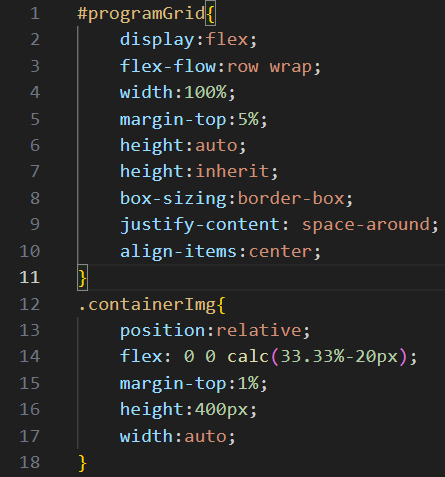
Lesson learned: If you’re still fighting with floating objects, stop. Flexbox and Grid are the cleaner way to build layouts, and offer way more possibilities.
3. Units matter more than you think.
Early on, I only used px for everything. Then my “responsive design” completely broke on different screen sizes.
CSS has relative units like %, em, rem, vh, and vw that scale beautifully. The clamp() function even lets you create fluid font sizes that adjust to the screen.
Lesson learned: Pick units intentionally. Use rem for typography, % or fr for layout, and clamp() for responsiveness.
4. CSS variables make life easier.
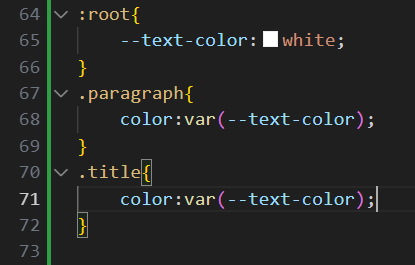
I didn’t even know CSS variables existed when I started. They let you define reusable values like colors, spacing, and fonts.
Lesson learned: Stop hardcoding colors and sizes everywhere. Variables make your CSS cleaner and easier to update.
5. The browser DevTools are Your best friend.
I used to refresh my page a hundred times, tweaking CSS blindly. Then I discovered browser DevTools. With a right-click → “Inspect,” I could test styles live, see the box model, and debug layout issues instantly.
Lesson learned: Spend less time guessing, more time using the tools built into the browser.
My takeaways
CSS can feel overwhelming at first. I used to think it was some kind of black magic. But the truth is, it’s just a different way of thinking. The moment I stopped fighting against it and started learning its rules, CSS shifted from being my biggest frustration to one of the most enjoyable parts of building websites.
If you’re just starting your journey, here’s what I’d suggest:
-
1. Learn the fundamentals: the cascade, specificity, and the box model are the backbone of everything.
-
2. Embrace modern tools: Flexbox, Grid, and CSS variables will make your life so much easier.
-
3. Experiment fearlessly: open up DevTools, tweak styles live, and see what happens. You’ll learn faster than you expect.